Battle Royale Simulator: What Is It?
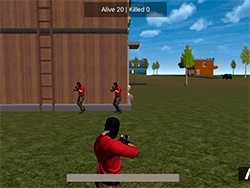
With Battle Royale Simulator, the wilder it gets in the 3D shooter realm, the closer you get to the intoxicating center of the turbulent battlefield! Let's insert excitement. Jump, parachute, gather gears, and prepare yourself to outlast the other enemies. This adrenaline-charged type of game is the pleasant marriage between action and strategic thinking-and that is your test to live through the onslaughts equally determined to win at all costs. This is truly an ultimate test of your skill, reflexes, and cleverness, with the aid of the most immersive 3D environment and intense combat. Will you be the last standing?
How It Works
- Move: Press the WASD keys to move about the battlefield.
- Jump: Using the spacebar key performs a jump or jumps out of the plane once dropping.
- Sprint: By holding down any movement key will make the character run faster.
- Switch Weapon: Pressing Q will allow you to toggle between weapons you have acquired.
- Look Around: Use your mouse to aim and look around the environment.
- Fire: Left click to shoot.
- Aim: Hold negligee and drag the mouse for precision aiming.
- Reload: By pressing R, you will reload your weapon.
- Throw A Grenade: G to throw grenades at your enemy.
- Crouch: Press C to crouch for hiding or taking cover.
- Car Enter/Exit: Press E to enter or get out of cars.
- Tab: Pressing Tab will bring up a pause menu.
Survival Tips & Tricks
- Loot Smartly: In the beginning, prioritize getting yourself a weapon along with basic armor. Don't bother going after empty crates.
- Stay Alert: Enemies may come from any direction; allow your ears to pick every footstep or explosion from afar.
- Use Your Environment: Use terrain such as hills, buildings, and other obstacles as cover when engaging enemy fire.
- Inventory Management: Pay close attention to your ammo and health. Should you deem to be low, take shelter somewhere so that you can safely reload or heal.
- Communication: If you are in a team, communicate using voice chat or path markings to synchronize movement and tactics.
History
While Battle Royale Simulator has been a very particular take on the famous battle royale-style type, a loyal following has emerged for the hardcore gameplay and the incentive of just being the last one standing. Updates have provided new maps, weapons, features over time, further giving the players a new experience every time they log in.
Play Unblocked
There are chances that Battle Royale Simulator faces blocking instances at school or workplace. Well be in trouble is there a solution to get the game unblocked? Some schools or workplaces will allow browsers or proxy tools that could again circumvent the restrictions. You can spend your time on the device that is free from these filters-a laptop or a smartphone.
Game Developer
The original idea for Battle Royale Simulator came from a team of passionate gamers and developers that wished to bring a realistic and engaging battle royale experience to life. Their dedication is witnessed by the continued updates and improvement the game has been subjected to over time.
Game Platforms
Battle Royale Simulator is gracing multiple platforms, which in turn make the game available for as many players as possible. Enjoy smooth gameplay on these:
- PC
- Mobile (iOS and Android)
- Web browsers (via Y8 and many more online game platforms)
How to Play Unblocked
You can try these if your Battle Royale Simulator is blocked at school or work:
- Use a : A virtual private network routes your internet traffic through a different server, ignoring restrictions imposed by a network.
- Request a Lift: Demand a lift from your school or work IT if you can defend the case that the game is useful or educational.
- Play on Personal Device: Walk in with your laptop or smartphone to play on locations free from restriction.
- Online Gaming Platforms: Try to play from websites such as Y8, whose services are supposed to be accessible from different locations.
Unblocked, you will not be interrupted.
Play Battle Royale Simulator on your Mobile

Span the QR Code with your mobile device camera to play Battle Royale Simulator
You can enjoy this game on mobile and tablet(such as iPhone, IPad, and Android device)
 𝐋𝐢𝐟𝐞 𝐒𝐢𝐦𝐮𝐥𝐚𝐭𝐨𝐫