What is Dragon Simulator 3D?
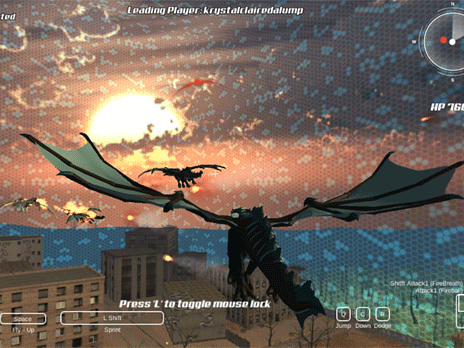
Take a hold of that feeling and experience a flying kick of Dragon Simulator 3D! With this adventure game, you can have fun and create your own dragon equipped with elemental powers-opposite: fire, ice, air. Whether flying over the open landscape, performing epic tricks, or just interacting with the environment, Dragon Simulator 3D will always lead you through a medium of freedom, strategy, and excitement. Select your trusty dragon's name and colors, along with his elemental power, and embark on an adventure where there are just no boundaries!
How to Play
Control your dragon using these intuitive controls:
- AWSD or arrow keys: to move around.
- Spacebar: to jump or fly up.
- C: to fly down.
- Q: to take off or to land.
- Shift: to move faster.
- Left mouse button: ranged attacks.
- Right mouse button: melee attacks.
Kill time by wandering the open world, chatting to humans or animals to gain rewards, or save them from dangers or death! But beware: Direct aggression towards a human causes them to form hostile thoughts against you!
Tips and Tricks
- Try all elemental powers: Each element has its special moves and abilities based on the element (fire, ice, air). Find what suits you best!
- Mind the human reactions: It may feel so good to attack, but humans will shoot arrows and throw weapons; choose your battles wisely.
- Limitless time for exploration: The open world hides rewards and secrets everywhere: keep flying high and looking around!
- Customize your dragon: Put a name or color to your dragon so that it fits your personality.
History
Dragon Simulator 3D is a part of the same series that bear titles like Tiger Simulator and Raccoon Simulator, each of which gives a different taste to wildlife. The game tries to stand on the shoulders of its predecessors, adding depth to dragon customization and open-world exploration while targeting simulation and adventure game fans.
Play Unblocked
Considering Dragon Simulator 3D is primarily an offline gaming facility, you can avoid unblocking issues if you have a device or network that permits access to gaming platforms. Please do check your school or workplace policy if you're playing at such a restricted environment.
Game Developer
An enthusiast team who develop Dragon Simulator 3D has a passion for simulation games and, thus, tries to offer an immersive experience that makes the player really feel like a dragon soaring through the skies.
Game Platforms
This platform-independent game goes on:
- The PC
- Mobile, both iOS and Android
- Switch
- PlayStation
- Xbox
How to Play Unblocked
In case you're at school or work with no access to Dragon Simulator 3D, the following tips might help you get in:
- Using a , connect to a server where the game is available;
- Check if the game can be found on a platform like Steam or the Epic Games Store, which sometimes can be accessed regardless of region;
- Ask the school or workplace IT department if they can make an exception for gaming purposes.
Gets you ready for Dragon-fueled adventures!
Play Dragon Simulator 3D on your Mobile

Span the QR Code with your mobile device camera to play Dragon Simulator 3D
You can enjoy this game on mobile and tablet(such as iPhone, IPad, and Android device)
 𝐋𝐢𝐟𝐞 𝐒𝐢𝐦𝐮𝐥𝐚𝐭𝐨𝐫